To convert a Publisher file to Word, upload the .pub file below. PubRescue produces a .docx in which every page keeps its original look and all the text is editable: the page design is placed as a background image and each text box is recreated as a Word text box at the same position, with the same font sizes and styles. You also get a PDF of each file. The first Word file of every upload is free, no signup. Opens in Word 2010 and newer, LibreOffice and Google Docs.
Convert Publisher files to Word
Drop .pub files, a folder or a ZIP here
PDF + editable Word · No signup · First 3 files free
Up to 500 MB and 5000 files per upload · Free uploads deleted after 24 h, paid after 7 days · Previews of every page are free
Word files (.docx) open in Word 2010 and newer, LibreOffice and Google Docs. Each page keeps the original look as a background image with the text in editable text boxes on top, so you can change the text and keep the design. Click a thumbnail to see every page.
Options
What the Word file looks like
Word and Publisher store documents very differently. A Word document is a stream of text that flows from page to page. A Publisher document is a set of boxes placed at exact positions on a page: a headline box here, three linked columns there, a photo overlapping a colored shape. There is no way to turn one into the other without choosing what to keep. PubRescue keeps the look and the text:
Each page is the page. The full page, as it would print, is placed as a picture behind the text, so colors, pictures, shapes and WordArt look right immediately.
Every text box is a Word text box. Text is laid out again line by line the way Publisher did it (same linked columns, same wrapping around pictures, same font sizes, bold and italic, bullets and tabs) and placed on top of the background in editable text boxes. Click into any text and change it.
Fonts. The document names the original fonts. If they're installed on your computer, Word uses them; otherwise Word substitutes. Line breaks are preserved as they were in Publisher.
What it is not: a reflowable Word document. Text doesn't flow from one column to the next inside Word, and pictures are part of the page background rather than separate objects you can drag. For changing a date, a paragraph, a price list or a name on a certificate, that's exactly what you want. For redesigning the page from scratch, start a new document and copy the text over.
How to convert Publisher to Word, step by step
Upload one .pub file, a folder or a ZIP in the box above.
Preview every page for free. Each thumbnail gets a PDF and a Word button.
Download the Word file. The first Word file and the first 3 PDFs of each upload are free; a plan from $9 unlocks all files of the upload as one ZIP that contains both the PDF and the DOCX of every file, with your folder structure kept.
Open it in Word (2010 or newer). Click into a text box to edit. Use File > Save As > PDF in Word when you're done, or print directly.
Example of the converter's output
The images below are first pages of two Publisher sample files converted with PubRescue, shown exactly as our converter produced them. The Word file of each page looks the same, with the text editable on top.
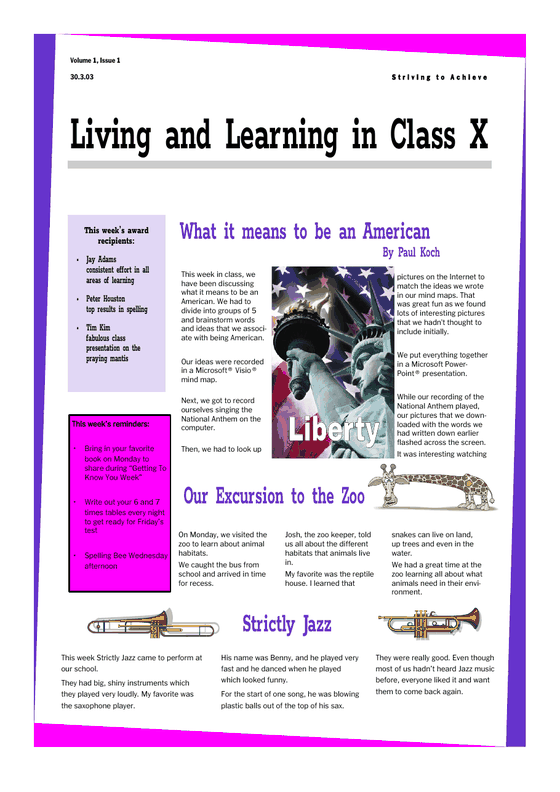
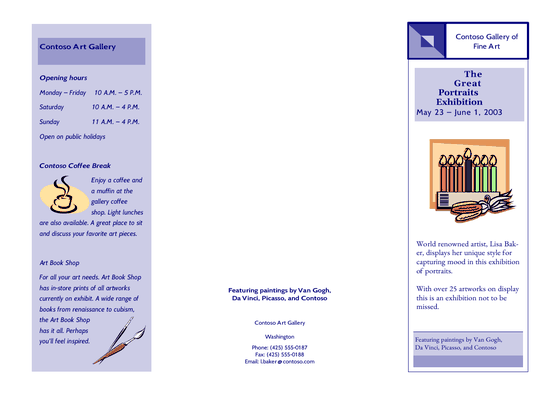
Sample newsletter (.pub, Publisher template), page 1, converted with PubRescue. Linked columns, sidebars and pictures stay where they were.Sample tri-fold brochure (.pub), page 1, converted with PubRescue. Fonts are metric-compatible replacements, so line breaks match the original.
Which documents convert to Word well
Certificates, letters, forms, price lists, menus, one-page flyers: very well. Edit the text, print.
Newsletters and bulletins with linked columns: well. Each column is its own text box; if you add more text to one column than fits, Word will not move it to the next column, so keep edits about the same length.
Pages with heavy WordArt or pictures you want to move: the look is kept, but those elements are part of the background image. The PDF plus a fresh Word template may serve you better here.
Should you convert to Word at all?
Archive and print (old newsletters, past bulletins, records): PDF is the better format. It never changes and opens everywhere. You get it with every conversion anyway.
Reuse with small changes (a yearly flyer, a certificate, a menu, this week's bulletin from last week's): the Word file.
Redesign (new look, new tool): take the text from the Word file and the pictures from your originals, and rebuild in Word, Canva, Affinity Publisher or Scribus. See our guide to Microsoft Publisher alternatives.
Publisher to Word converters compared
Feature comparison of PubRescue, Zamzar and generic free converters
Feature
PubRescue
Zamzar
Generic free converters
Bulk upload (ZIP or folders)
Yes, up to 5000 files in one upload
Files are uploaded individually (a paid plan allows several at a time)
Varies, often one at a time
Keeps folder structure
Yes, one ZIP back with your folders
Not documented
Varies
Editable Word (DOCX)
Yes, re-typeset like Publisher does
PUB to DOC (older Word format) is offered
Varies
Pricing
One-time, from $9, no subscription
Subscription, from $12 per month
Varies
Free tier
Previews of all files; first 3 PDFs and 1 Word file per upload; 500 MB per upload
2 files per day, 3 MB per file
Varies
Zamzar figures are taken from zamzar.com and may change; check their site for current terms. "Generic free converters" vary too much to summarize. We only list what is factual.
Pricing
Free
$0
Previews of every page of every file
First 3 PDFs and 1 Word file per upload
No signup, no card
Starter
$9 one time
Up to 20 files in one upload
PDF and editable Word (DOCX)
One ZIP, folder structure kept
Results stay downloadable for 7 days
Most popular
Archive
$29 one time
Up to 500 files in one ZIP
PDF and editable Word (DOCX)
Folder structure kept
Results re-downloadable for 7 days
Organization
$99 one time
Up to 5000 files per upload
PDF and editable Word (DOCX)
Priority in the conversion queue
30-day pass code for several uploads
Download link stays 7 days
Receipt/invoice with company details (issued by Lemon Squeezy)
One-time payments, no subscription, nothing renews. The plan is applied to the upload you choose it for; Organization also gives you a 30-day pass code for more uploads. Payments and receipts are handled by Lemon Squeezy, our merchant of record, which also charges and remits sales tax and VAT. Not happy? See the refund policy: if the paid conversion doesn't work for you, write to us within 14 days and we refund you.
Frequently asked questions
Can PubRescue convert Publisher files to Word (.docx)?
Yes. Every uploaded .pub file is converted to a PDF and to an editable .docx. The first Word file of each upload is free; paid plans unlock all of them.
Can Word open .pub files directly?
No. Microsoft Word cannot open Publisher files. You need to convert them first, which is what this page does.
Which version of Word do I need?
Word 2010 or newer on Windows or Mac, Word for the web, LibreOffice Writer or Google Docs. Word 2007 and older can't open the file format we produce (.docx with text boxes positioned on a page background).
Is the text in the Word file really editable?
Yes. Every text box from the Publisher file becomes a Word text box with real text. Font sizes, bold, italic, colors, bullets and alignment are kept. Pictures and shapes are part of the page background, which keeps the look but means you can't move them individually.
Will the fonts be the same?
The Word file names the original fonts. If they are installed on your computer, you'll see them. If not, Word substitutes a similar font. Line breaks are kept as in the original.
Can I convert a whole archive to Word?
Yes. Upload a ZIP or folder with up to 5000 files; the ZIP you download has the PDF and the DOCX of every file side by side, in the same folders as your originals.
Is PubRescue related to Microsoft?
No. We're an independent service and not affiliated with Microsoft.
 PubRescue